
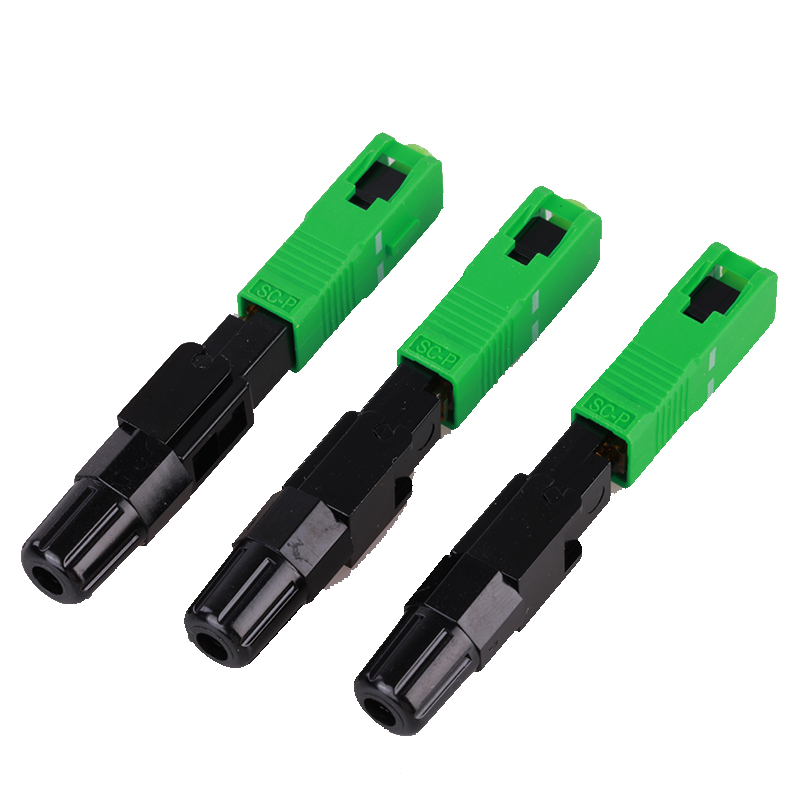
Fast Connector vs Pigtail, Adapter and Fusion Splice
These components solve different termination problems. A fast connector is installed on site; a pigtail provides a connectorized end for fusion splicing; an adapter only aligns two existing connectors; and a fusion splice joins prepared fibers using a splicing process. Treating them as interchangeable can produce the wrong installation method or missing tools.
| Component | What it does | RFQ decision |
|---|---|---|
| Fast connector | Terminates a prepared fiber end in the field. | Interface, polish, fiber/cable diameter, procedure, tools and test method. |
| Fiber pigtail | Provides one connectorized end and one bare fiber end for splicing. | Connector, polish, length, fiber type, splice tray and packing. |
| Fiber adapter | Aligns and mates two compatible connectors. | Interface, polish compatibility, simplex/duplex format and mounting. |
| Fusion splice | Joins prepared fibers in a controlled splice workflow. | Fiber preparation, splicing equipment, tray/closure and test plan. |
Nine Fields to Include in a Fast Connector RFQ
| RFQ field | What to specify | Why it matters |
|---|---|---|
| Connector interface | SC, LC or FC, including the adapter or equipment port. | Defines mechanical compatibility at the connection point. |
| Polish | UPC or APC according to the existing link requirement. | Prevents a polish mismatch; connector color alone is not enough. |
| Fiber mode | Single-mode or multimode and the project fiber category where required. | Controls link compatibility and the connector model to review. |
| Fiber or cable diameter | 250 um fiber, 900 um fiber, 2 mm, 3 mm or another confirmed size. | Fast connector bodies are not universally compatible with every diameter. |
| Application location | FTTH terminal box, wall outlet, ONT/ONU side, indoor distribution or maintenance. | Confirms access, handling, protection and installation constraints. |
| Installation method | Fiber preparation, cleaving, assembly procedure, tools and installer conditions. | Mechanical termination performance depends on correct preparation and assembly. |
| Acceptance test | Continuity, insertion loss, return loss, end-face inspection or project-defined record. | Aligns delivered evidence with receiving and field acceptance. |
| Identification and packing | Connector labels, dust caps, individual bags, cartons and project labels. | Reduces installation mix-ups and protects prepared components. |
| Quantity and delivery | Pieces by interface/polish, destination and target delivery window. | Prevents a mixed or incomplete shipment; final trade terms depend on the RFQ. |
Check Compatibility Before Choosing the Connector
SC or LC interface
Confirm the adapter, equipment port and available space. The interface determines the connector body and the installation-side fit.
UPC or APC polish
Match the approved link interface and do not infer the specification only from a blue or green body.
Fiber preparation
Confirm the prepared fiber type, cleave requirements, coating or cable diameter and the procedure expected at site.
Test and inspection
State whether the buyer needs continuity, optical loss, return-loss, end-face or installation records after termination.
Common Fast Connector Purchasing Mistakes
- Writing only “SC fast connector” without specifying UPC or APC and the mating adapter.
- Assuming a 250 um, 900 um, 2 mm or 3 mm fiber/cable can use the same connector model.
- Ordering a connector without confirming the field preparation tools and procedure.
- Comparing a fast connector with a factory-terminated patch cord without accounting for site labor and test responsibilities.
- Leaving the acceptance test, dust-cap protection, labeling and packing format until shipment.
- Requesting a fixed price before interface, compatibility, quantity and destination are confirmed.
Copyable Fast Connector RFQ Schedule
| Field | Buyer requirement |
|---|---|
| Product | Fiber optic fast connector |
| Interface / polish | SC / LC / FC ___ ; UPC or APC ___ |
| Fiber mode | Single-mode or multimode; category ___ |
| Compatible fiber/cable | 250 um / 900 um / 2 mm / 3 mm / other ___ |
| Application | FTTH terminal box / wall outlet / ONT or ONU / maintenance / other ___ |
| Installation procedure | Preparation, cleaving, assembly tools and site method ___ |
| Testing | Continuity, insertion loss, return loss, end-face or other record ___ |
| Identification and packing | Labels, dust caps, bags, cartons and project marking ___ |
| Quantity and destination | ___ pieces; destination country and target delivery window ___ |
For the installation choice between a fast connector and fusion splicing, read the fast connector vs fusion splicing guide. For connector and adapter boundaries, use the fiber component selection guide.
Frequently Asked Questions
Can one fast connector fit every fiber or cable?
No. Confirm the connector model, prepared fiber or cable diameter, fiber construction, installation procedure and approved application before ordering.
Should I choose UPC or APC?
Choose the polish that matches the adapter, equipment interface and approved link requirement. Do not use connector color as the only specification.
What tools should be included in the RFQ?
State the preparation and cleaving process, required assembly tools, cleaning method and any installer training or procedure requirement. The final tool list depends on the selected connector model.
Is a fast connector the same as a pigtail?
No. A fast connector is installed in the field on a prepared fiber end. A pigtail has one connectorized end and one bare fiber end for a fusion-splice workflow.
Need a Fast Connector RFQ Review?
Send the interface, polish, fiber or cable diameter, application, installation method, test requirement, quantity and packing details. The final connector model and delivery terms should be confirmed before quotation.
View Fast Connector ProductWhatsApp RFQSend RFQ Details